
What to fix first
Category scores and a to-do list sorted by severity. Raw values always shown alongside.
Seoray shows everything a page declares for SEO — and what to fix first — in Chrome's side panel. With copy-ready fix code.
Chrome 116+ · English and Turkish · Your data stays in your browser
Everything a classic meta viewer does, plus prioritization, on-page highlighting and copy-ready code.
Category scores and a to-do list sorted by severity. Raw values always shown alongside.
Snippets for missing title, description, canonical, Open Graph, schema, robots.txt and sitemap, prefilled from the page.
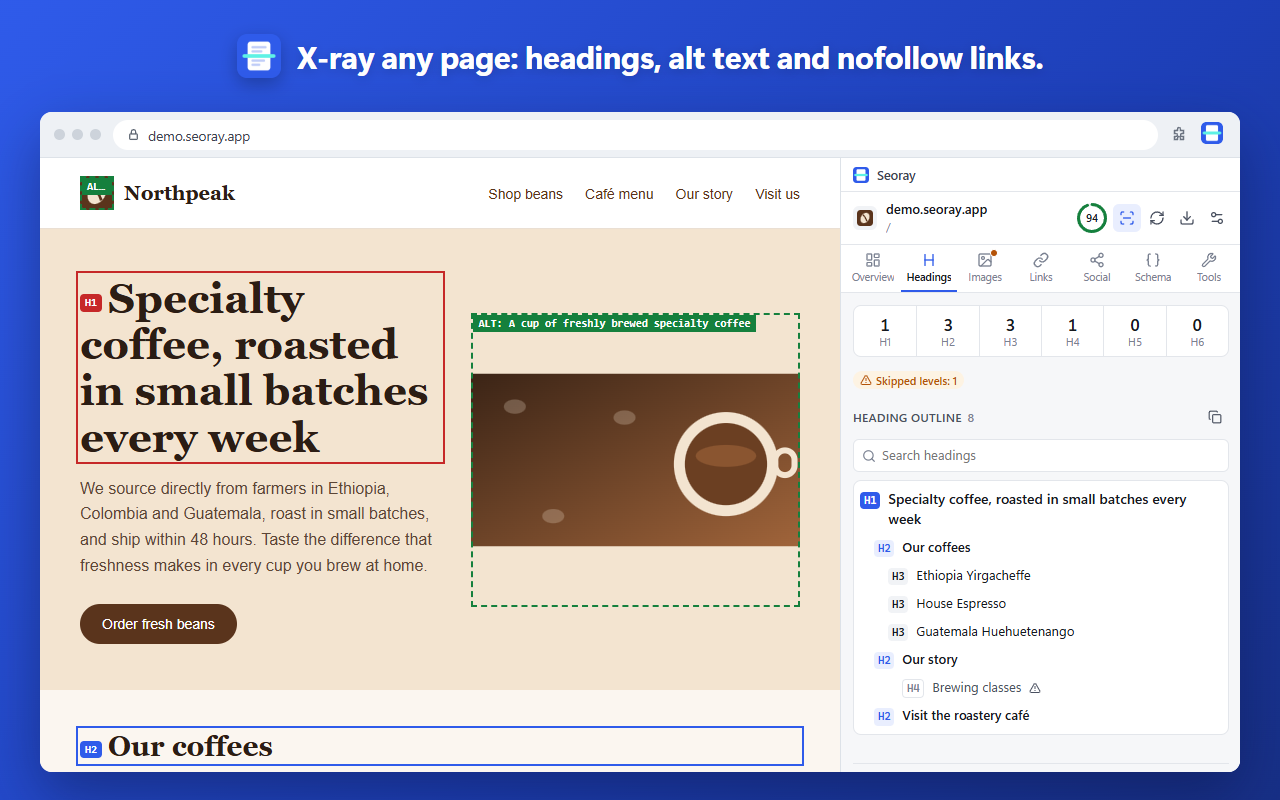
Marks headings, images without alt text and nofollow links directly on the page.
Checks the page's links in one click and lists broken links and redirects separately.
Shows where Google cuts your title on desktop and mobile, plus social share cards.
Compares the server's HTML with the rendered page, so you see when key content only appears after JavaScript.
The real extension, on a fictional demo site.
One click, a to-do list, fix code, X-ray mode and the broken link check.
The analysis runs in your browser. No page content, history or personal data is sent to a server.
At install it only accesses the tab you click. Auto-analysis on every site is optional.
No sign-up, analytics, ads or remote code. Completely free.
Yes. Every feature is free; no account or card needed.
Nowhere. Seoray only reads the page you are viewing, in your browser. The robots.txt and sitemap checks send cookie-less requests only to the site you are analyzing. Details are in the privacy policy.
Not at install. It is requested only if you turn on "Auto-analyze on every site" in settings or run a link check, and you can turn it off any time.
Chrome 116 and later. A Microsoft Edge version is coming soon.
Click the Seoray icon in the toolbar or press Alt+Shift+S. The side panel opens and analyzes the page.
Use "Send feedback" in the extension or the contact link below. We read every message.